

Att spela rätt kort i din webbplatsstrategi kan göra hela skillnaden när det gäller att driva trafik och intäkter. Ett av de verktyg som diskuteras nuförtiden, särskilt med det uppkomsten av IA, är robots.txt. Det är en enkel textfil som hjälper sökmotorer att fokusera på dina mest värdefulla sidor. Om den används korrekt kan den förbättra genomsökningseffektiviteten, stödja innehållsupptäckt och hjälpa till att maximera din webbplats prestanda. Låt oss titta närmare på hur den fungerar.
Vad är robots.txt?
Robots.txt är en textfil som kan placeras i roten av din webbplats domän för att tala om för sökmotorernas robotar vilka sidor de ska genomsöka och vilka de ska undvika. Tänk på det som en reseguide, men för webbläsare. Genom att vägleda webbläsare bort från områden med lågt värde kan det hjälpa sökmotorer att fokusera sina genomsökningsresurser på ditt viktigaste innehåll. Detta gör att du som utgivare kan prioritera trafik till ditt mest relevanta innehåll.
Tänk på att en robots.txt-fil inte helt döljer din sida för sökmotorer och att inte alla kommer att följa dina instruktioner. Om du vill att en webbsida ska tas bort från sökresultaten, använd en noindex-direktiv och tillåt sökmotorer att komma åt sidan så att de kan se den instruktionen, eller lösenordsskydda den sida du vill hålla privat.
Hur fungerar en robots.txt-fil?
När en "crawler" besöker en webbplats kontrollerar den vanligtvis robots.txt-filen (eller en cachelagrad version av den) innan den kryper URL:er. Detta ger den instruktioner som du har angett om vilka områden den kan komma åt och vilka den inte kan. robots.txt-filen finns på yourdomain.com/robots.txt och ser ut så här:
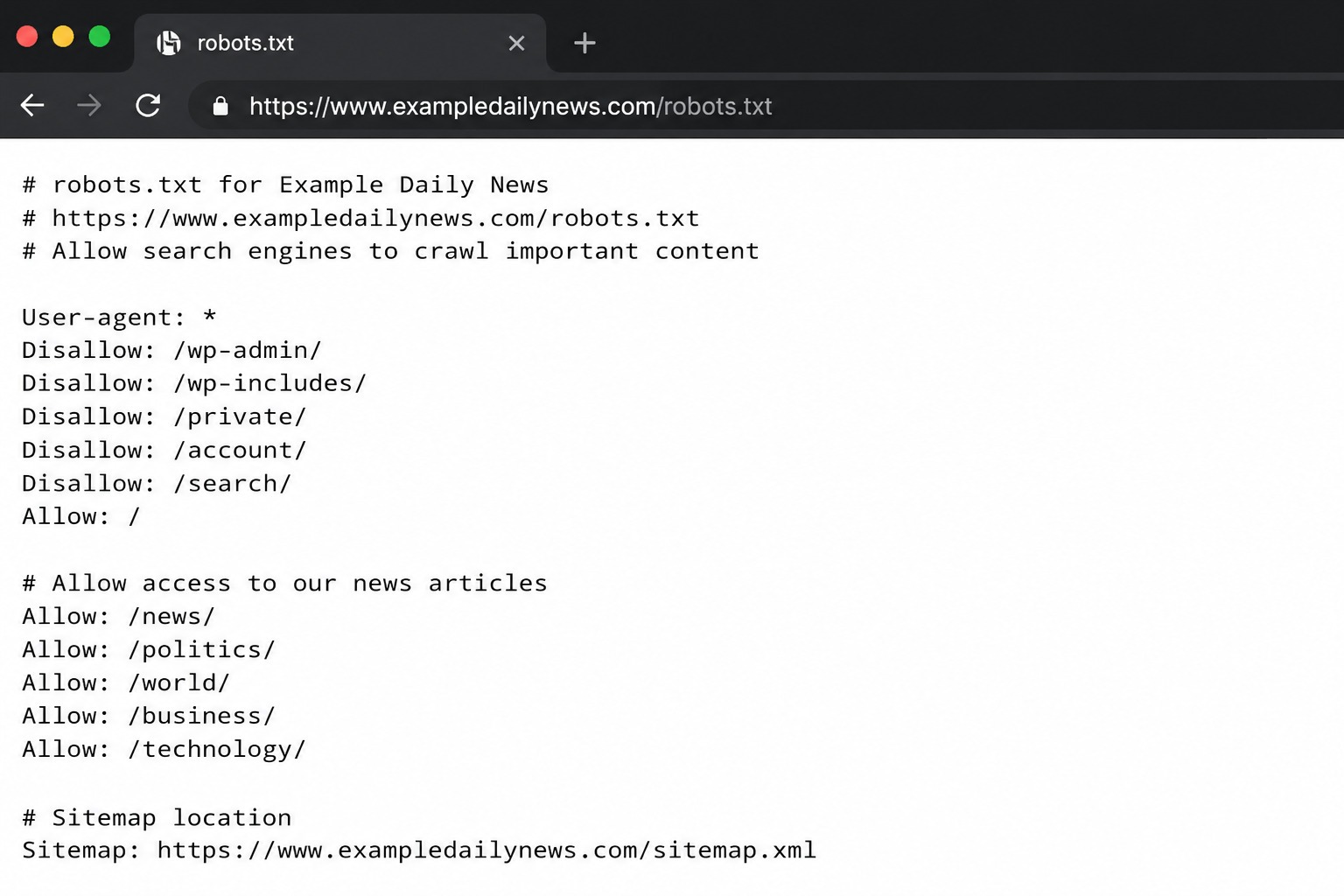
En robots.txt-fil använder en syntax av grundläggande direktiv som sätter grundreglerna för hur bottar ska agera på din webbplats. De är:
-
- Användaragent: Detta anger namnet på boten som du vill tillämpa reglerna för (Googlebot, Applebot, Bingbot, etc.). Om du vill att dina regler ska gälla för alla botar, behöver du bara ange en * i det här fältet istället för botens namn.
- Tillåt inte Som namnet antyder talar den om för botten vilka sidor eller filer den inte får komma åt. Ungefär som en nattklubbs dörrvakt, fast för en webbplats.
- Tillåt Denna direktiv anger för bottar vilka sidor eller underkataloger de kan genomsöka, även om hela katalogen har en avvisningsregel.
- Webbplatskarta Många utgivare inkluderar en sitemap-referens i sin robots.txt-fil, vilket gör det enklare för sökmotorer att hitta och genomsöka viktiga sidor på deras webbplatser.
Till exempel, om du inte vill att bottar ska söka igenom din sida med “senaste nytt”, men du vill att en specifik artikel ska indexeras, skulle din robots.txt-rad se ut ungefär så här:
Användaragent: Googlebot
Neka: /latest-news/
Tillåt: /senaste-nytt/artikelnamn/
Hur man skapar en robots.txt-fil
Låt oss göra saker enklare för dig. När du har bestämt vilka sidor du vill blockera från crawlers kan du använda plugins som YoastSEO i WordPress för att skapa och redigera din robots.txt-fil.
För att göra det manuellt behöver du öppna en enkel textfil, till exempel Anteckningar, och spara den under namnet “robots.txt”. Lägg sedan till direktiven och ladda upp filen till din rotkatalog.
Slutligen, efter att du har laddat upp filen, kontrollera den genom att Google Search Console genom att kontrollera rapporten om genomsökning och indexering, och testa viktiga URL:er med verktyget URL-inspektion. GCS är väldigt praktiskt för att hålla koll på webbplatsens hälsa, status för genomsökning och indexering, samt sökningstrafik. Nyligen meddelade Google Search Central att de har implementerat en prestandarapport för ny generativ AI-sökmotor för att hålla koll på dina GEO-insatser. Håll utkik efter vår kommande artikel om hur du använder den här rapporten för din strategi!
Varför robots.txt spelar roll för utgivare
För utgivare kan robots.txt vara ett användbart SEO-verktyg som hjälper sökmotorer att genomsöka din webbplats mer effektivt, upptäcka relevant innehåll och förbättra webbplatsens övergripande prestanda. Detta kan i sin tur bidra till att maximera dina annonsintäkter.
Hjälper till att kontrollera krypbudget
Sökmotorer tilldelar en begränsad “crawl budget” per webbplats. Genom att neka sidor med lågt värde (som interna sökresultat, dubblettsidor eller privata filer) leder du spindlar till ditt relevanta innehåll, vilket förbättrar indexeringseffektivitet och webbplatsens prestanda.
Förbättrar SEO-prestanda
Robots.txt-filer hjälper till att förbättra effektiviteten för indexering och prioritera trafik. De hjälper till att fokusera på dina mest värdefulla sidor och stödjer snabbare upptäckt av ditt innehåll. De håller också crawlers borta från URL:er med lågt värde som testsidor, dubbletter, inloggningsområden, etc.
Kontrollerar innehållsskrapning av AI-modeller
Du kan signalera till AI-robotar att de inte ska komma åt visst innehåll på din webbplats. Det här alternativet ger dig större kontroll över ditt innehåll och hjälper till att skydda det om du inte är bekväm med LLM:er att använda den. Däremot, om du inte har något emot extra exponering och ser generativa AI-verktyg som en varumärkesmöjlighet, kan du tillåta deras webbcrawlers på din webbplats som du anser lämpligt.
Tänk på att regelefterlevnad varierar mellan olika crawlers och beror på om de respekterar robots.txt.
Optimera webbplatsens prestanda
Att använda robots.txt kan hjälpa till att minska onödig bot-trafik och serverbelastning. Genom att begränsa hur många sidor botar indexerar har din server mer resurser för riktiga besökare, så sidor laddas snabbare. Detta hjälper din Core Web Vitals, förbättra användarupplevelsen.
Bästa praxis för att använda robots.txt
Att ha en robots.txt-fil är inte ett måste för de flesta webbplatser. Den kan dock fungera som en bra SEO strategi för att maximera din genomsökningsbudget, förhindra serveröverbelastning och skydda visst innehåll. Om du väljer att använda den, kanske du vill följa dessa bästa praxis:
Använd inte robots.txt för att dölja ditt innehåll från SERP
Om ditt mål är att hålla innehåll privat eller helt ta bort det från sökresultat, använd en noindex-tag istället för att förlita dig på robots.txt. Detta beror på att Google kan fortfarande indexera en sida om det finns en extern länk till den, även när Googlebot är förbjuden att genomsöka den genom robots.txt.
Undvik att blockera några viktiga resurser
Var försiktig så att du inte blockerar resurser som CSS, JavaScript eller bilder som din webbplats behöver för rendering, eftersom sökmotorer är beroende av dem för att förstå sidans layout och funktionalitet.
Utför regelbundna tester och uppdateringar av din robots.txt-fil
Problem med din robots.txt kan påverka din SEO. Därför är det viktigt att uppdatera din fil när du fortsätter att skapa bra innehåll och din webbplats utvecklas. Att testa den kan hjälpa till att säkerställa att alla dina direktiv tillämpas korrekt och att det inte finns något som stör renderingen.
Robots.txt som en strategi för utgivare: ta det eller lämna det?
Robots.txt är mer än en teknisk SEO-fil. Det är en guide som bestämmer hur bots, crawlers och AI-system kan interagera med innehåll på din webbplats. Detta gör att du kan prioritera trafik till de värdefulla sidorna som förtjänar rampljuset. För utgivare är det ett strategiskt verktyg för att hantera synlighet, prestanda och innehållsåtkomst som ett proffs, särskilt i en tid där sökning förändras som vi känner den.
Lär dig mer om hur du ökar din trafik i denna nya era för upptäckbarhet med vårt webbinarium “Sökande återuppfunnet: Hur förlag kan konkurrera i en AI-förstvärld”. Du kan också gå ett steg längre och begära en Gratis Webbplatsanalys. På så sätt får du personliga rekommendationer om hur du maximerar din intäkt och prestation för långsiktig tillväxt.