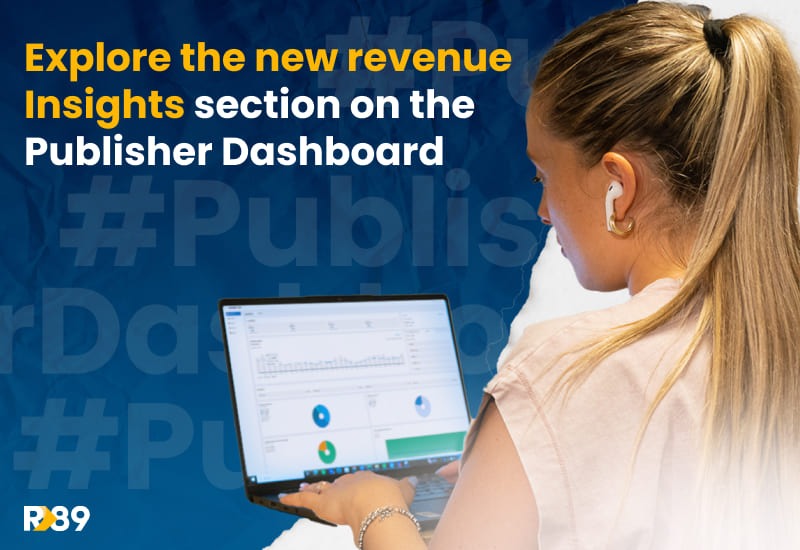

Zu wissen, wie Ihre Anzeigenumsätze im Detail aussehen, ist ein echter Wendepunkt für Ihre Werbestrategie. Aber dorthin zu gelangen, kann wie eine Schatzsuche sein, wenn Sie sich in Berichtstools wie nicht auskennen. Google AnalyticsDafür stellen wir einen neuen Insights-Bereich in deinem Publisher Dashboard vor, mit einer intuitiven Aufschlüsselung der Inhalte, die deine Werbeeinnahmen generieren, um datenbasierte Entscheidungen zu unterstützen.
Was ist das Publisher Dashboard von Refinery89?
Das Publisher-Dashboard ist unser Verlags-Sidekick zur Visualisierung der Leistung ihrer Anzeigenmonetarisierung. Dieses benutzerfreundliche Control Panel ermöglicht es Ihnen, Ihre wichtigsten Erkenntnisse und monetarisierbaren Seiten im Auge zu behalten, Ihre ads.txt-Dateien zu verwalten, Rechnungen zu prüfen und uns für Support anzurufen.
Wir haben einen neuen Bereich eingerichtet, der Ihre Werbeeinnahmen nach Inhalten aufschlüsselt, während wir die Funktionen weiter verbessern. Nun können Sie Ihre Werbeeinnahmen nach URL, Land und Traffic-Quelle überprüfen.
Welche Einblicke können Sie aus dem Publisher-Dashboard gewinnen?
Werbeeinnahmen
Sieh dir an, wie viel Werbeeinnahmen du erzielt hast, sobald du die Plattform aufrufst. In diesem Bereich findest du interaktive Diagramme, die du anpassen kannst, um deine Werbeeinnahmen-Trends im Zeitverlauf einfach zu verfolgen, Wachstumschancen zu erkennen oder mögliche Probleme zu identifizieren.
Top-Seiten
Erfahren Sie, welche Seiten auf Ihrer Website am besten funktionieren. Dies kann Ihnen helfen, die relevanten Seiten zu identifizieren, die Ihr Publikum am häufigsten besucht, damit Sie Ihre Inhalte, Ihr Layout und Ihre Benutzererfahrung verbessern können.
Top Länder
Entdecken Sie die Länder, in denen Ihre Inhalte am beliebtesten sind. Nutzen Sie dies als Gelegenheit, Ihre Website-Strategie anzupassen, um Ihr internationales Publikum anzusprechen und es effektiv zu monetarisieren.
Schlüsselkennzahlen
Vergleichen Sie Ihre Impressionen, CPM, monetarisierbaren Seitenaufrufe, Einnahmen, RPM und Viewability, wann immer Sie möchten. Sie können die Anzeige Ihrer Metriken nach Belieben personalisieren. So haben Sie die volle Kontrolle, um sich auf die Daten zu konzentrieren, die für Ihre Leistungsziele am wichtigsten sind.
Anzeigen.txt Manager
Überprüfen und verwalten Sie Ihre ads.txt-Dateien an einem Ort! Sie können den Status Ihrer ads.txt-Datei überprüfen und Zeilen nach Bedarf hinzufügen oder entfernen. Denken Sie daran, dass es äußerst wichtig ist, sie auf dem neuesten Stand zu halten, damit Sie keine Werbeeinnahmen verlieren! Erfahren Sie hier mehr über ads.txt.
Ad Free URLs
Überprüfen und verwalten Sie die Seiten, auf denen keine Anzeigen angezeigt werden sollen. Mit dieser Funktion können Sie die URLs der Seiten hinzufügen, auf denen keine Anzeigen erscheinen sollen. Ideal für Inhalte, die bestimmten Richtlinien unterliegen, Advertorials oder sensible Bereiche. So können Sie die geltenden Vorschriften einhalten und gleichzeitig Ihre Monetarisierungsstrategie transparent und gut organisiert gestalten.
Rechnungen
Transparenz ist in unserem Dashboard kein optionales Extra. Im Finanzbereich kannst du deine gesamte Abrechnungshistorie einsehen und Rechnungen jederzeit herunterladen. Hier kannst du den Status deiner Zahlungen und die erhaltenen Geldbeträge verfolgen.
Technischer Support
Wir stehen Ihnen durch dick und dünn zur Seite! Auf dem Publisher-Dashboard haben Sie einen direkten Ansprechpartner. Von hier aus können Sie sich mit unserem Team in Verbindung setzen, um Ihnen bei der Lösung von Problemen zu helfen, die unterwegs auftreten können.
Was ist der neue Bereich „Revenue Insights“ im Publisher Dashboard?
Wir stellen das neue Insights-Bereich, ein leistungsstarker neuer Bereich im Publisher Dashboard, der unseren Publishern ein auf Monetarisierung ausgerichtetes Analyseerlebnis bietet.
Bisher hatten Publisher nur eine eingeschränkte Sicht darauf, warum sich ihre Einnahmen von Tag zu Tag verändern, aber das ändert sich jetzt. Der Insights-Bereich bietet eine speziell entwickelte Analyseebene, die Publishern hilft zu verstehen, was ihre Performance antreibt: welche Inhalte die meisten Einnahmen generieren, welche Länder am besten konvertieren und wie sich verschiedene Traffic-Quellen auf die Monetarisierung auswirken.
Welche Daten können Publisher im neuen Bereich „Revenue Insights“ verfolgen?
Leistung auf Seitenebene
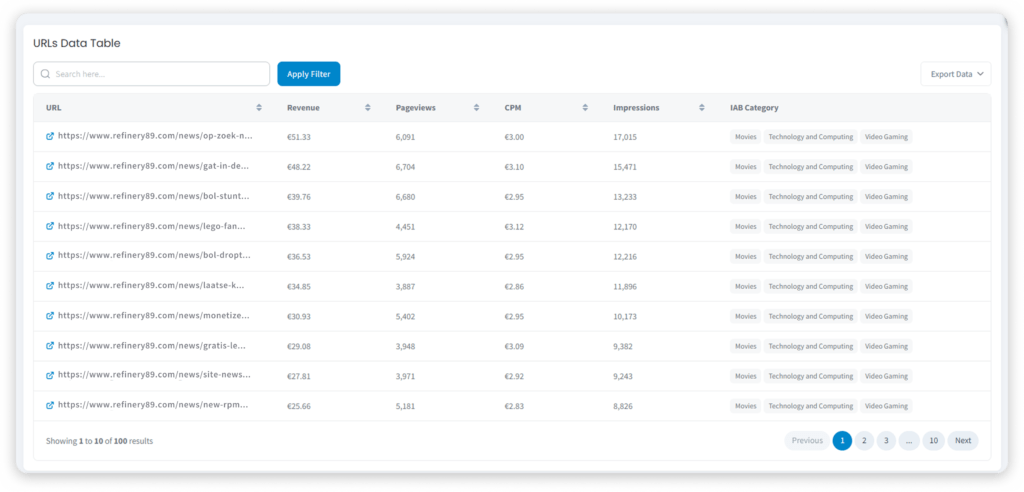
Publisher können genau erkennen, welche URLs auf ihrer Website den größten Gewinn erzielen – und nicht nur den meisten Traffic generieren. Zu den Kennzahlen, die Sie hier finden, gehören Umsatz, Seitenaufrufe, RPM, CPM, Impressionen und die IAB-Kategorie pro URL.
Das bedeutet, dass Publisher erkennen können, welche Artikel oder Bereiche ihrer Website den höchsten Werbeumsatz pro Besuch generieren, Inhalte mit schlechter Performance trotz hoher Besucherzahlen identifizieren und priorisieren können, wo sie ihre redaktionellen oder SEO-Bemühungen zur Leistungssteigerung konzentrieren.
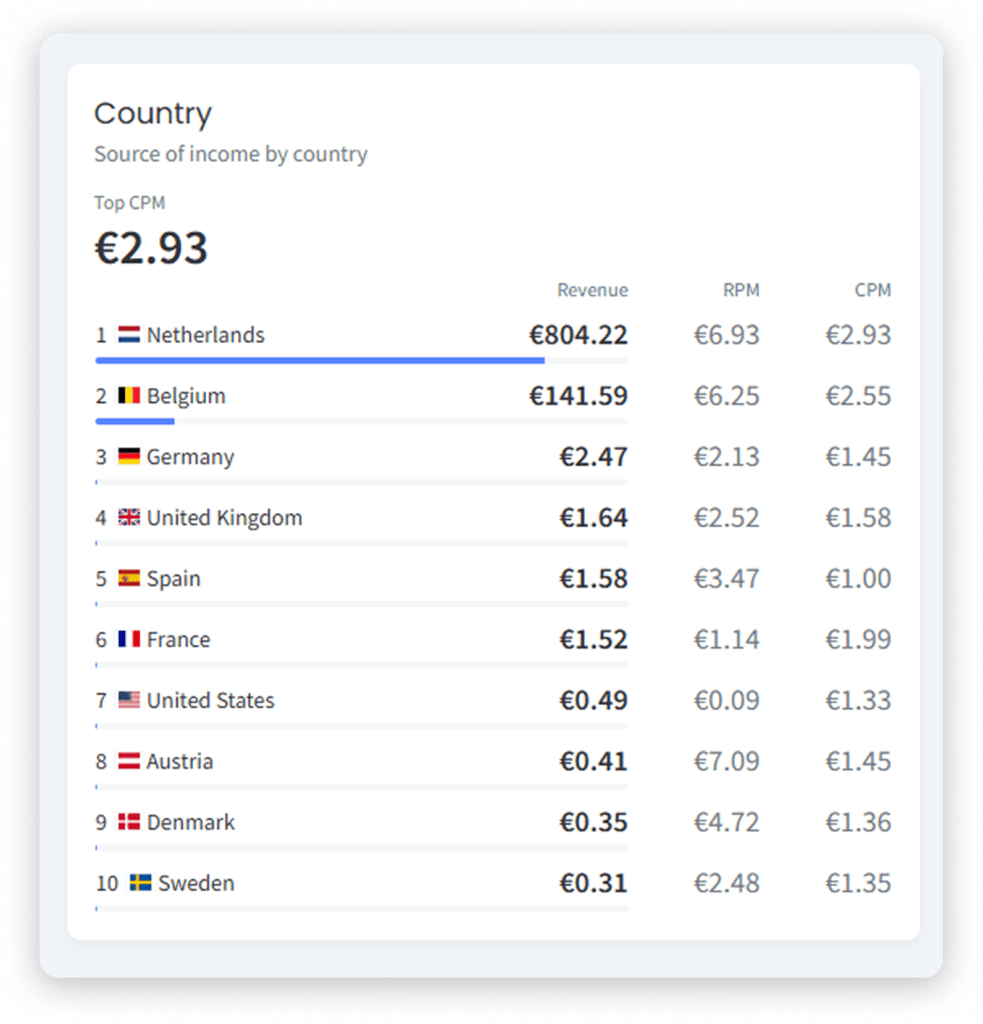
Länderübergreifende Leistung
Die Aufschlüsselung nach Ländern zeigt, wie sich die verschiedenen Regionen auf Ihre gesamten Werbeeinnahmen auswirken, wobei Kennzahlen wie Umsatz, RPM und CPM pro Land berücksichtigt werden. Anhand dieser Informationen können Sie erkennen, ob Ihre internationale Zielgruppe effizient monetarisiert wird, und Entscheidungen hinsichtlich der geografischen Ausrichtung oder der Lokalisierung von Inhalten treffen.
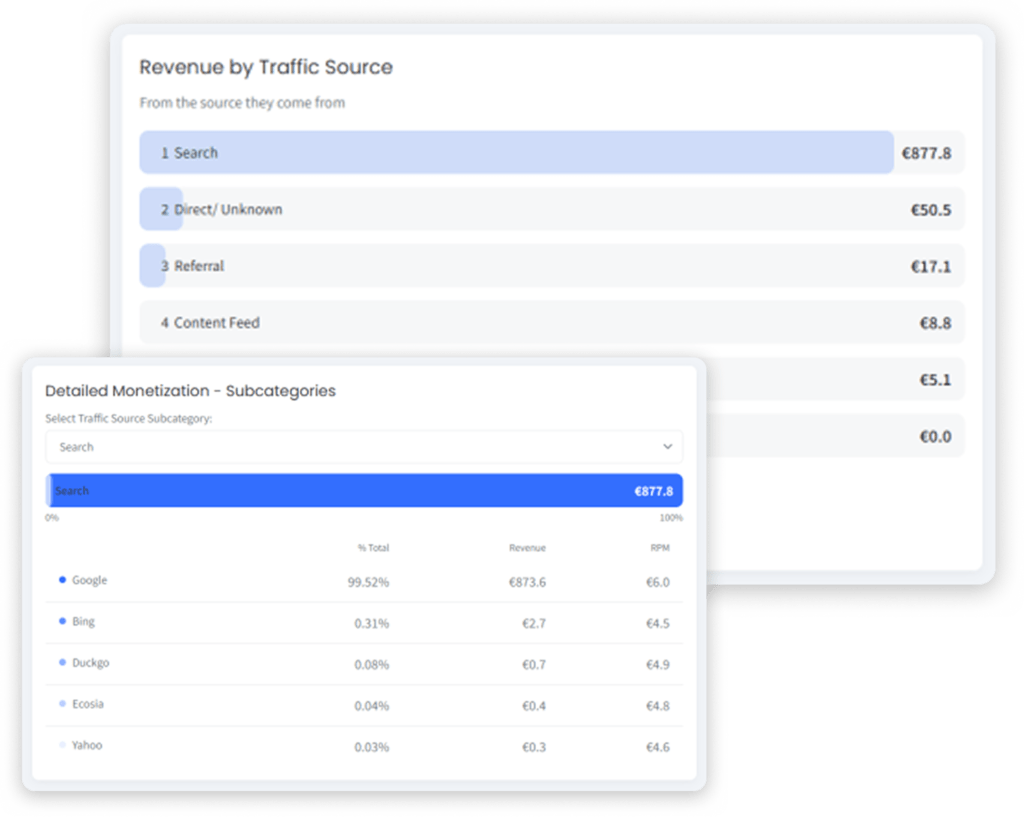
Traffic Sources Performance
Du kannst sehen, wie sich deine verschiedenen Traffic-Quellen in wichtigen Monetarisierungs-Kennzahlen verhalten, mit vollständigen Aufschlüsselungen. Das hilft Publishern wie dir zu verstehen, ob organische, direkte, Social- oder andere Traffic-Quellen deutlich unterschiedliche Umsatzergebnisse erzielen. Auf Basis dieser Daten kannst du deine Content-Distributionsstrategie entsprechend anpassen, um deine Einnahmen weiter zu steigern.
Wer hat Zugang zu diesen neuen Updates?
Bitte beachten Sie, dass der neue Bereich „Insights“ nur für Web-Publisher die Google Ad Manager (GAM) nutzen. Publisher, die GAM nicht verwenden, können diese Funktion nicht im Menü ihres Dashboards sehen.
Wie profitieren Publisher von den neuen Revenue Insights?
Als ehemalige Publisher haben wir uns das Ziel gesetzt, Publishern bereitzustellen klare und zuverlässige Einblicke darüber, wie verschiedene Traffic-Quellen zu den Werbeeinnahmen beitragen. So sind Sie mit den richtigen Informationen ausgestattet, um Ihre Werbefinanzierungsstrategie anzupassen.
Unser Publisher Dashboard steht dir zur Verfügung, um:
- Akquisitionskanäle optimieren
- Transparenz und Vertrauen in Berichterstattung verbessern
- Heben Sie sich durch umsetzbare Erkenntnisse ab
Wie sieht die Zukunft des Publisher Dashboard aus?
Unser Technikteam arbeitet kontinuierlich daran, Ihnen noch mehr zu bieten umfangreichere Analysen auf Seiten-, Länder- und Traffic-Quellen-Ebene in zukünftigen Updates. Wir wollen klarstellen Umsatztreiber so darzustellen, dass Publisher sie verstehen und sofort handeln können, um Umsatz und Website-Performance zu maximieren. Möchten Sie als Erster erfahren, wann diese Upgrades auf Sie zukommen? Abonnieren Sie unseren Newsletter, um alle unsere Updates zu erhalten!
Entdecke die neuen Revenue Insights selbst!
Die neuen Revenue Insights sind im Publisher Dashboard verfügbar, damit du sie jederzeit überprüfen kannst! Denk daran, dass du ein Web-Publisher sein musst, der mit GAM verbunden ist, um sie in voller Pracht sehen zu können. Frag deinen Account Manager nach den neuen Revenue Insights oder kontaktiere unser Team, damit sie dir das Dashboard kostenlos zeigen.